Showing posts with label iPads. Show all posts

Tuesday, February 18, 2014

Today's Meet and Whole Day Plan


They say curiosity killed the cat. I say curiosity is the road to the worlds best discoveries.

Now I'm no scientific genius on the road to a Nobel Prize discovery, but I am curious. So, I decided to try 2 new things in my classroom this week.

The first was sparked from one of my graduate classes, Making Sense for the Struggling Reader. One of the required texts in Richard Allington's book What Really Matters for Struggling Readers. You can find it at Amazon if you want to read it. It looks like this:

Anyway, in the book, Allington mentions the Whole Day Plan. Did you know there's not a lot of research out there in this? I spent hours trying to find something and got zip! I emailed my professor and we decided I would experiement with it. This week I create the Whole Day Plan where I teach only 1 subject all day long. To keep things engaging in the room, I decided to create a schedule where students would do a mini lesson then rotate centers back and forth all day. Yesterday was Math Day. The cool thing was seeing all the light bulbs go off throughout the day instead of throughout the week. The students really enjoyed the change.  Today is Reading Day, so we will see if they are as engaged today as they were yesterday.

Even though I decided to try the Whole Day plan, I didn't want to totally leave out reading a writing. We read literature to go along with the Math Concept and I have a cool way to have students write about Math. I used the website todaysmeet.com. I created QR codes for the URL and posted them on colored paper throughout the room. I had students scan the QR code and log onto the website to chat with each other about the things they learned, questions they had, etc. Since they are in first grade, it took a long time for them to type what they wanted to say, but as time goes on they will get better at it. Here are a few pictures of what the students looked like while they were chatting yesterday.


And one last picture....a screen shot of what the page looks like when you go to create your page. Make sure you safe your unique URL so you don't have to go back and create a new room each time.



Sunday, February 9, 2014

Using Skitch to assess student understanding of plot

Last week, we were finishing up a unit on story elements and I wanted a way to assess students on how well they could retell the lot of a story. 

First I showed my students how to use the Skitch app and walked through it step by step. We used a familiar read aloud. Here was my example.
Then students read a book from their book baskets. These baskets are leveled so they are books that students can read an understand independently. The students were to choose a literary text and retell it using the Skitch app. Here is one sample of student work.
The retellings were simple but seeing that this was the first time they had ever used anything like this, I think they did a pretty good job.

Skitch is free from the App Store. Look for this icon.


Skitch has endless possibilities. What are some you can think of?

Sunday, January 26, 2014

Popplet ABC Books

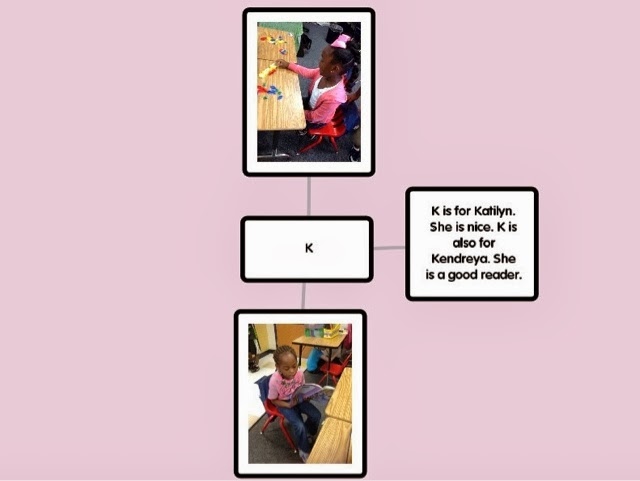
In first grade, kids are practicing with letters and sounds. In the beginning they need practice just knowing their letters. Our Grae level team came up with the idea of creating a MHW ABC book for things we found around the school. Here are some examples of the slides we created for the ABC book. We assigned each child a letter and here are the things they came up with. 


Using Popplet to introduce yourself

One of my favorite apps for classroom use is Popplet lite. At the beginning of the school year, I used Popplet to do an introduction of myself to the class. I inserted pictures and wrote sentences in this graphic organizer to tell all about me.
Then, I showed students how to use Popplet so they could create their own. The great thing about this is now students have a graphic organizer that can be saved to the camera roll and printed. Students can use their graphic organizer to write a paragraph about themselves.

Popplet has endless possibilities. How could you use Popplet in your classroom.

Thursday, October 24, 2013

Using QR Codes in the Classroom

Tim Tebow Reads Green Eggs and Ham

This video is now linked to the Green Eggs and Ham books in my classroom? How? QR codes! Here's how it worked.

I went to a qr code creator online. The one I used to create the QR code for this one was qrcode.kaywa.com. I copied and pasted the URL for the YouTube video. Click generate static and a qr code appears. Then, I print the qr code and tape to the front of the book. Now when students scan the qr code on the front of the book, the video pops up ans they can listen to Tim Tebow read the book to them.

This is not just limited to YouTube. Record books yourself. Have parents come in and record them reading. Administrators and stakeholders can come in to record themselves. Children really enjoy these books and these are great for students to listen to during center time.

Thursday, August 1, 2013

2 must have apps

You guys are lucky! 2 posts in one night! 

I want to share 2 apps that are must haves for reading teachers. 

The first is called Common Core Concept Bank.

This app is from the makers of ScootPad. You launch the app and press your grade level, subject, and specific standard. Then an amazing thing happens! Instant question banks that address that particular standard. It will definitely help with CCSS instruction and Smarter Balance.

The next is Record of Reading.

This app is made by Clemson University (GO TIGERS,)
The app lets you record student reading, take a running record, type in student info at the top and type a short summary of student reading. But wait...there's more! Once you are finished with the running record, you can save it to a folder and email it to yourself. Imagine how awesome this paperless data will be. Not to mention instead of lugging around your data notebook or forgetting your clipboard in your car (yeah I've done that), all you would need is your iPad. I think this is one of the most useful apps I've seen.

The best part is that both of these apps are totally free!
So what are you waiting for? Get off of this blog right now and go download these apps!

How my 2 yr old inspired my 1st grade classroom....

Meet Micah.

This spunky and smart 2 year old loves books. He loves to listen to stories. He loves to talk! Everyday when I pick him up from daycare, we have conversations about what he learned that day.

Two days ago I picked him up from daycare and told him that we were going to see his grandparents instead of going straight home. He was cranky from taking a shorter than usual nap. So naturally he wanted out of the carseat. To take his mind off of the  mini meltdown in the back seat, I started telling him what I could see. The conversation went something like this:

"I see a truck." "I see a truck too." "I see a tree." "I see a tree, too."

The longer we drove the more the conversation built.

"I see McDonalds." "I see McDonalds, too." "What color is it?" "It's yellow!"

As the conversation continued I began thinking about my beginning readers. They need to build a sight word bank. They pass lots of places and things on their way to school, and around the school.

EPIPHANY!

I decided that since emerging readers build confidence and stretch their reading muscles by reading...and that young students also tend to write higher than their reading level...I came up with the idea that my students can write about the things they see. Since we have iPads, students can take pictures of their surrounding and put them into a predictable book where they have written the words. That also means that with these students, they will instantly be successful readers and writers! They can put their books in the classroom library to read over and over again. And being able to integrate technology is a nice little added bonus.

I am so excited about this project and I can't wait to tell my 1st graders about it!

Thursday, July 11, 2013

Apps Right Now!

I've been hard at work today on a presentation I am doing at a workshop for our district at the beginning of the school year. It's about how we worked with iPads last year in our school.

One of the things I worked on was create an aura with Aurasma. I created a 3D aura on the cover of one of Micah's books. Now we can scan the front of his book about trucks and a 3D red truck will appear. I can't wait to show it to him!

The other thing I worked on was an iMovie trailer. I'm so excited about it. It's up on my youtube page. Click the link below to see it.

http://www.youtube.com/watch?v=-erP1ZXvTCk

Every time I work on this presentation I get more and more excited about next year! Anybody doing anything interesting next year to get ready?